
How to Advertise on Google: A Step-by-Step Starter Guide
How the Google Ads auction works, how to structure an account, which campaign type to choose and what to check before launching your first campaign.
Contents
Advertising on Google means bidding on selected keywords through a Google Ads account so your business appears as a paid result in search and across Google’s other surfaces. Google Ads is one of the most widely used digital channels for expanding reach, finding new customers and growing a business, and when it is set up properly it can put your business in front of a very large audience.
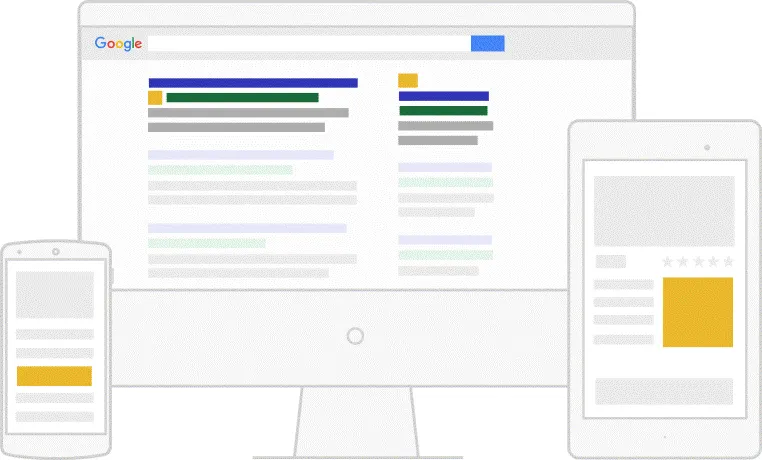
How does advertising on Google work?
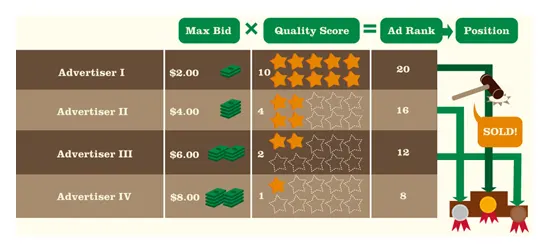
Google Ads acts as an auction, but unlike a regular auction it is not just your bid that matters: the auction also takes into account the quality and relevance of your advertising campaigns. This means the playing field is comparable for everyone, not only for advertisers with the deepest pockets.
The Google Ads auction is built around the concept of keywords. Advertisers identify keywords relevant to their business that searchers are likely to use, then bid by stating how much they are willing to pay each time a user clicks their ad. This is where the term “pay-per-click advertising” comes from. For a closer look at the model, see our what is PPC article.
When a user types a query, an auction runs in a fraction of a second among the eligible ads. Three components decide the outcome: your bid, the quality signals of your ad, and the expected impact of your ad assets. Strengthening the quality side is usually a more sustainable approach than simply raising bids.
What does an optimal Google Ads account structure look like?
The first step is to consider your account structure. There are many ways to organise a Google Ads account, such as mirroring your website’s structure or following your product categorisation, but the most effective accounts share the same characteristics when it comes to hierarchy.
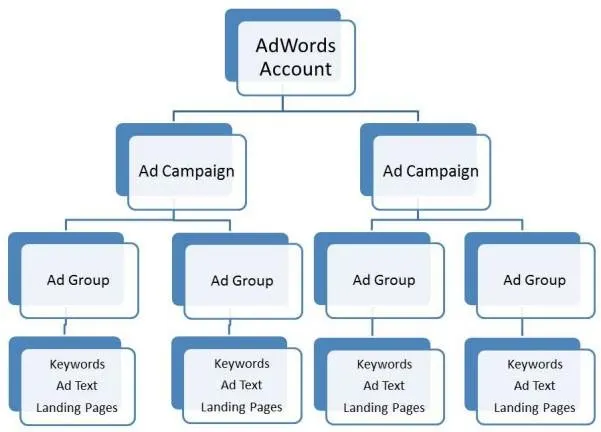
The hierarchy has three layers:
- Account: the top level, where billing, access permissions and general settings live.
- Campaign: each account holds one or more campaigns. Budget, location targeting, language and bidding strategy are set at campaign level. Some advertisers run a single campaign, others run many at once.
- Ad group: each campaign hosts several ad groups, each with its own keywords, ad copy and attached landing pages.
Your account may not mirror this hierarchy exactly, but organising it this way keeps the factors that influence PPC metrics such as Quality Score tidy and tightly themed. A practical test: when you look at an ad group, you should be able to see that its keywords share a single search intent and that the ad copy answers that intent directly.
Which campaign type should you choose?
Google Ads offers several campaign types serving different goals:
- Search: text ads shown while the user is actively looking for something. The most direct option when demand already exists. If you want to understand how those results are produced, our what is a search engine article is a good starting point.
- Shopping: product listings with image, price and store name, driven by your product data. Built for e-commerce.
- Display: visual ads for broad reach and remarketing.
- Video: awareness and consideration campaigns on YouTube.
- Performance Max: combines Google’s inventory into a single automation-driven campaign.
Most advertisers start with a search campaign, because that is the channel where intent is clearest and easiest to measure.
What should you check before launching?
Where the campaign sends people matters as much as how it is built. The landing page receiving that traffic should make a clear promise, load fast and focus on a single action. When the message in the ad and the message on the page drift apart, cost per click rises and conversion rate falls.
Before you launch, also complete the following:
- Conversion tracking must be set up and tested. You cannot judge a campaign you are not measuring.
- Negative keyword lists should be built so irrelevant queries are filtered out from the start.
- Match types should be chosen deliberately: broad match brings more queries, exact match gives more control.
- Ad assets such as sitelinks, callouts and call extensions should be added so the ad uses its space efficiently.
- Budget and bidding strategy should follow the goal. Setting aggressive automated targets before conversion data accumulates makes the learning phase harder.
What happens after launch?
Advertising is not a one-off task. In the first weeks you need to review the search terms report regularly and grow the negative keyword list, refresh underperforming ad copy and verify that conversion data is accurate. Basing decisions on a meaningful body of data rather than on daily fluctuations produces far more reliable results.
If you would like help structuring a new account or reviewing an existing one, you can reach us through our contact page.
Published: · Updated: · Author: Moon Workshop
Frequently Asked Questions
How does the Google Ads auction work?
Is there a minimum budget for advertising on Google?
How many keywords should an ad group contain?
What does Quality Score affect?
Related Articles
- Google Ads3 min read
What Is PPC (Pay-Per-Click) and Why Is It Important?
What the pay-per-click model is, how fixed-rate and bid-based pricing differ, why keyword selection decides results, and the advantages of PPC.
- Google Ads6 min read
Benefits of Google Ads: 7 Reasons to Grow Your Business
The biggest benefit of Google Ads is that it works faster than SEO. Seven concrete advantages, from brand awareness and remarketing to measurement.
- Google Ads3 min read
Make Your Site Mobile-Friendly for Google Ads
A site that is not mobile-friendly loses impressions, clicks and conversions from Google Ads. What to fix in a mobile-first world.